ik-raakte-mijn-spraakvermogen-kwijt-kan-een-ai-kopie-me-weer-een-stem-geven

NRC 22-102024
Het lijkt wel of je te veel gedronken hebt en dubbelpraat, zei Marriet mijn vrouw, twee jaar geleden op een reis door de Pelopponnesos. Ik had bijna niets gedronken en toch...Verder geen aandacht aan geschonken. Maar het kwam terug; eerst met de uitspraak van de L en de R. Toch eens naar de huisarts. Doorgestuurd naar de specialisten- naar neurologie. En dan begint het circus van onderzoeken en testen. De uitslag….Door een neurologische aandoening wordt de doorgifte van de zenuwprikkel vanuit de hersenen naar de spier geblokkeerd. Mijn lippen en tong hebben hun kracht verloren. Spreken gaat moeizaam en eten/drinken is een opgave. Helaas is er geen remedie.
It seems as if you have had too much to drink and are double-talking, said Marriet my wife, two years ago on a trip through the Peloponnese. I had hardly drunk anything and yet…I paid no attention to it. But it came back; first with the pronunciation of the L and the R. Still, I went to the doctor. Referred to specialists - to neurology. And then the circus of research and testing begins. The result... Due to a neurological disorder, the transmission of the nerve impulse from the brain to the muscle is blocked. My lips and tongue have lost their strength. Speaking is difficult and eating/drinking is a task. Unfortunately, there is no cure.
And now? Bravely Forward!; however it took some time to take that step. Losing my ability to speak is an attack on my identity. Moreover, this violation of the ability to communicate sometimes creates the feeling of being trapped within yourself. It's not just that I can no longer say something the way I want to, but it's also difficult to make spontaneous, direct contact with others. I have to speak slower, enunciate more clearly and then hope that people understand what I have to say.
Here are some answers by ChatGPT on the following questions:
How can data journalists use Google sheets ml app?
What is the use of the ml app in google sheets for data journalists?
Can you give an example?
What is the use of ChatGPT for data journalists?


Some examples of data sensors running on various micro controllers:
1. Measuring climate in the living room on Raspberry Pi with a SGP30 measuring Co2 and DHT 22 voor temperature and humidity. Display graphics using Node-Red.

Measuring Co2 with Arduino showing LCD crystal display and RGB led for different levels of Co2

2. Measuring the weather with ESP32 Fire Beetle with BME280 measuring temperature, humidity and pressure. Display with ESP chart web server.
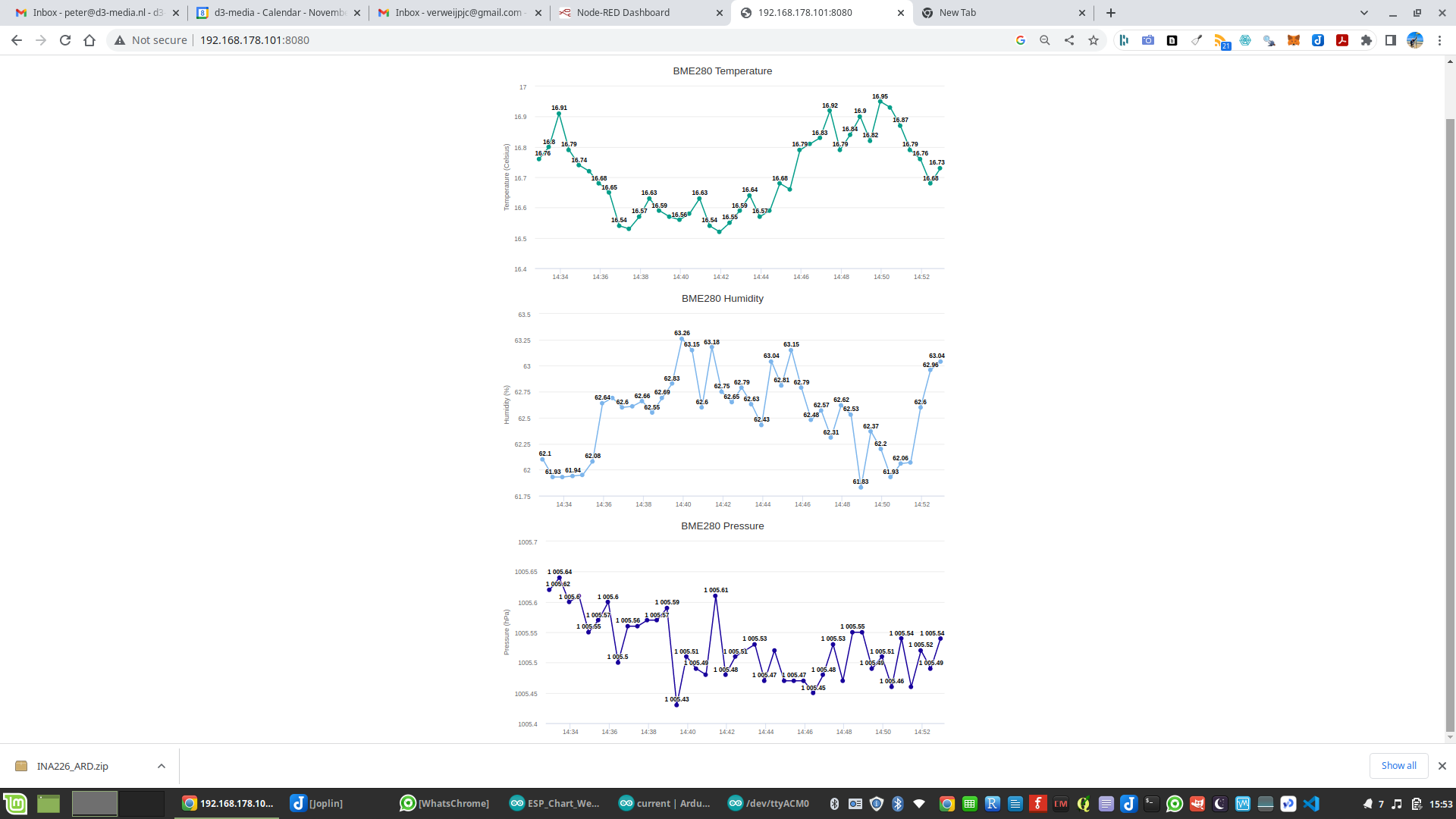
3. Mini solar panel measuring current with an Arduino Mega 2560, using INA219 and display on serial monitor, plotter and crystal LCD.


I am not a huge fan of installing all kind of gadgets on my machines. The leaner the better. Sometimes I am seduced and I install a new piece of gadget software. Lately I installed the following:
1. joplin for making and archiving notes;
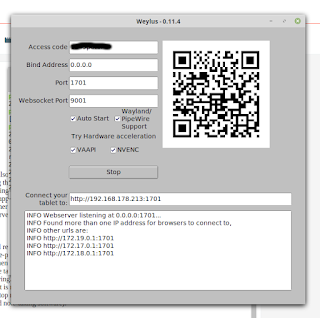
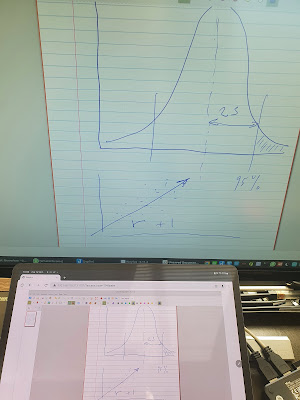
2. weylus for making drawings and graphs on my tablet and displaying this on a large screen.
Joplin
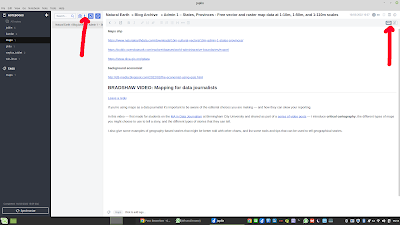
Making notes is chaos. I use a simple text editor or a word processor. This leaves me with all kind of text files under different names stored in a folder notes, and I have folders like this on different devices such as a phone or my tablet. What I need is a piece of software that stores my notes and synchronize it my other devices. Joplin is a find: doing exactly what I need, easy to use and to install. It is available for all OS, from Windows to Linux and Android. Here is a screen dump of the program.

Video presentation by Paul Bradshaw, Birmingham City University.
Data journalism isn’t just about spreadsheets and interactives: in this video from my MA Data Journalism classes at Birmingham City University I look at why the news industry has expanded its focus on data journalism over the past decade, and how thinking about definitions of data journalism can help reporters think more broadly about potential stories and subjects beyond official statistics.
I also look at related terms such as computational journalism, robot journalism and augmented journalism — and what we can learn from those definitions as practitioners.
|
|
Hieronder een korte screencast over de Marantz Turret met gebruik van OBS.
Covid has definitely transformed the way of working. No rush to the office in morning, hanging out at the coffee machine, or watching the clock during a meeting. We all work from home. And here starts generally the problem. You need an office space at home, and a good computer to do your work and connect to your colleagues. Generally a laptop with build in camera and mic, or a bit more sophisticated using a small webcam on top of the screen. For short meetings and chats the quality of mic and cam is acceptable. However, did you ever tried to do a lecture of a training?
In those situations you need more professional devices: high quality sound and video, but also a good angle for the camera, for example at three quart and not full face.
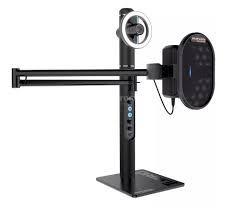
After some searching I choose the Marrantz Turret (https://www.marantzpro.com/products/view/turret). The Turret is a complete broadcasting system with a full HD webcam and USB condenser microphone with an integrated pop filter. It also includes a dimmable led light ring with different colors. Connecting the device with a Linux system and a windows 10 laptop was no problem. Power up the Turret connect the USB output to you system; choose the settings for the Turret camera and sound from the menu and you are in business.
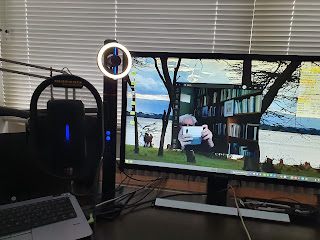
In combination with video conferring software like Zoom or Teams, the Marrantz Turret worked great. More interesting is streaming or recording with the Turret. For online training you would make some demo’s of the example’s that could we watched later. Or you can stream your lecture to the students audience. For this type of work OBS, Open Broadcasting System(https://obsproject.com/), is a good choice. The good news is that the Marrantz Turret cooperates flawless with OBS, and using a virtual camera the Turret connects also to Teams of Zoom.
Installed the GUI for controlling Ubuntu in WSL. Here is an interesting recipe:
https://www.makeuseof.com/tag/linux-desktop-windows-subsystem/

The environment variables(temperature, humidity and pressure) are shown on the node red dashboard in the background and streaming on the sense hat display.


I used these data 4 years ago to build a weather station using MySQL and R; here are the links:
1. https://d3-media.blogspot.com/2017/01/weather-data.html
2. https://d3-media.blogspot.com/2017/01/the-electronic-barometer-2.html
3. https://d3-media.blogspot.com/2017/01/the-electronic-barometer-3.html

Tello creates its own based WiFi network. It uses 2.4 Ghz and UDP as protocol to communicate with a client over ports 8889 at the server and 8890 at the client.
Let’s first look at the WiFi. When you directly connect from your cellphone no security protocol is used; just an open WiFi connection between server 192.168.10.1(tello) and the client 192,168.10.2(phone).
IN-USE SSID MODE CHAN RATE SIGNAL BARS SECURITY
* TELLO-627F4A Infra 4 54 Mbit/s 95 ▂▄▆█ --
If you create a password, an option in the settings of the app, WPA2 is used as the security protocol.
IN-USE SSID MODE CHAN RATE SIGNAL BARS SECURITY
TELLO-TELLO-627F4A Infra 4 54 Mbit/s 100 ▂▄▆█ WPA2
You can remove the password by holding the start button for 10 sec. Tello will completely reset.
Tello is equipped with SDK: software development kit. The Tello SDK 2.0 user guide gives an overview of programming commands. Download here:https://dl-cdn.ryzerobotics.com/downloads/Tello/Tello%20SDK%202.0%20User%20Guide.pdf.
Packet Sender
Is it possible to send SDK commands directly to the Tello?
When a computer is directly connected to the Tello network, you could give commands directly to to the Tello. Install ‘Packet Sender’ and send UDP packages to the Tello on address 8889. Tello will reply with OK.
Here is a screenshot showing battery, takeoff and land.

How about connecting the Tello to you home network with WiFi? Yes that is possible, then Tello is not an access point anymore but a client to the home WiFi network.More on this: https://tello.oneoffcoder.com/swarm.html
Home Network
Adding Tello to the home network:
Run the following python script: python set-ap-mode.py -s [SSID] -p [PASSWORD]
Here is the response:
sending cmd command
from ('192.168.10.1', 8889): b'ok'
sending cmd ap [SSID] [PSW]
from ('192.168.10.1', 8889): b'OK,drone will reboot in 3s'
Now Tello is a client of you home network, and directly connecting to the Tello from the phone app is not possible anymore.
Next: We have to scan the network for the IP number of the Tello
nmap -sP 192.168.178.0/24 or nmap -sT 192.168.178.1/24
Nmap scan report for _gateway (192.168.178.1)
Host is up (0.0080s latency).
Nmap scan report for 192.168.178.24
Host is up (0.015s latency).
Nmap scan report for 192.168.178.52
Host is up (0.081s latency).
Nmap scan report for 192.168.178.80
Host is up (0.034s latency).
Nmap scan report for 192.168.178.101
Host is up (0.035s latency).
The last one was newly added to the home network.
Ping on that address:
peter@Pegasus:~/Desktop/TELLO$ ping 192.168.178.101
PING 192.168.178.101 (192.168.178.101) 56(84) bytes of data.
64 bytes from 192.168.178.101: icmp_seq=1 ttl=255 time=1.33 ms
We could check the connection by sending UDP packages with packet sender.
Or run python scripts to control a flight or a mission of the Tello. But in the scripts you have to update/change the IP address of the Tello and the ID. Send sn? with packet sender to get the ID.
From the oneoffcoder site – https://tello.oneoffcoder.com/swarm.html – try the following scripts.
demo_single.py and demo_status were working. Don’t forget to update the IP number and ID when connected to local wifi network.
You can also create a complete mission and save taht in a .txt file.
Then run:
python planned-flight.py -f cmds-01.txt

See also my blog posting Flying Around(3).
Java ScriptNot only Python but also JavaScript is possibility to control Tello from the command line.
But you have to install the environment to to load a JavaScript for execution. I used the Snapstore and searched for npm to install node.js.
The following GitHub repository has a few scripts to get started:
https://github.com/jsolderitsch/tello-nodejs
You can run for example:
node TelloCommandLine.js
this invites you to send commands to the drone
Tello Command Console
---------------------------------------
Tello> Enter a Tello SDK Command.
Tello> command
Command: command
Data received from server : ok
Tello> takeoff
Command: takeoff
Data received from server : ok
Tello> land
Command: land
Data received from server : ok
Tello> command
Command: command
Data received from server : ok
Tello> takeoff
Command: takeoff
(If the port is already in use; run sudo pkill -9 node)
Node-Red
A special case for controlling Tello with JavaScript is Node-Red. Here is the GitHub repository:
https://github.com/johnwalicki/Node-RED-Tello-Control
What exactly is Node-RED?
Node-RED is a programming tool for wiring together hardware devices, APIs and online services in new and interesting ways. It provides a browser-based editor that makes it easy to wire together flows using the wide range of nodes in the palette that can be deployed to its runtime in a single-click.
Node-RED allows you to create functionality by wiring together flows of data between nodes using a browser. And it has gained tremendous popularity in the IoT space, by modeling bits of application functionality between IoT devices like sensors, cameras, and wireless routers.
Node Red is developed by IBM and is block based coding in a browser. After deploying the code you can have the results. Here are two pictures that show the basics: left the block coding and right the result after deploying.


A desktop or laptop is not great fun for controlling the Tello. Node_red can also be installed on an android device, like a phone or tablet. A complete install is possible, but a bit complicated because you have to set up Termux on your phone/tablet.
For installing Termux, see also http://d3-media.blogspot.com/2021/04/data-journalism-on-samsung-tablet-with.html
After installing Termux is here the recipe for installing node red: https://nodered.org/docs/getting-started/android
Much easier is to install an app RedMobile Lite – Node -RED on Android.
Node Red is especially interesting for IoT, internet of things, connecting devices and data streams. Connecting Tello with Amazon Alexa is an example. Here is the code: https://www.hackster.io/econnie323/alexa-voice-controlled-tello-drone-760615 . After installing you will be able to control Tello with voice commands.
When you buy a Tello EDU you have 4 mission pads, which enable the drone to fly special assignments. To fly a mission there are special command available. Look at the Mission Pad User Guide. Available at :https://dl-cdn.ryzerobotics.com/downloads/Tello/Tello%20Mission%20Pad%20User%20Guide.pdf .
However flying a mission was more complicated. I had 3 problems:
1. the mission pad numbers
2. set up a mission from the command line
3. X and Y coordinates
First problem: pad numbers MID mission pad ID
It seems the pads have numbers, but I could not find where that number was. How can you find out?
Go to github: https://github.com/dbaldwin/DroneBlocks-DJITelloPy-Tutorial . Here you find a bonus script : bonus_01_get_tello_state.py.
If you run that script and tello is on a pad it will give you the mid.
Here is the output when Tello flying over MID 1:
'agx': -6.0,
'agy': 10.0,
'agz': -999.0,
'baro': 112.27,
'bat': 61,
'h': 70,
'mid': 1,
'mpry': '2,-4,178',
'pitch': 0,
'roll': 0,
'temph': 47,
'templ': 44,
'time': 12,
'tof': 83,
'vgx': 0,
'vgy': 0,
'vgz': 0,
'x': -10,
'y': 3,
'yaw': -1,
'z': 84}
Do that for all 4 pads front and backside and write the number on the pad.
Just discovered that the number is on the pad: printed as white line between the stars! If you look closely it is a number. Here is for example pad 3:

Second: how to set up a mission with 4 pads.
The mission pad works as a switch; like if…. Then. Read the guide closely.
Set up the following:
M1 M2 M3 M4 are the MIDs
The arrow is the direction, represented by the direction of the rocket on the pad. ( I come back to this later)

Next we need a command line to send instruction to the Tello.
Go to https://tello.oneoffcoder.com/python-manual-control.html . Under section 8 you find the scripts to send commands to the Tello.
For example:
python3 app.py -f command4.txt
In this case the commands in the txt file command4 are send to the drone.
And here are the commands for command4 forcing the Tello to fly a square over the pads.
(Important to understand is that you have to state the x,y,z coordinates of each MID)
command
takeoff
battery?
mon
mdirection 0
jump 0 80 60 60 90 m1 m2
#(tello is on m1 flies to 0 80 60, speed 60, if m2 is recognized camera is turned 90 degrees)
delay1
jump 0 80 60 60 90 m2 m3
delay 1
jump 0 80 60 60 90 m3 m4
delay 1
jump 0 80 60 60 90 m4 m1
delay 1
land
And the result is this video:
Problem 3: X and Y
The coordinates are looking peculiar; I just discovered them by trial and error. But when I changed the direction of the pads(direction of the rocket) it did not work anymore. I needed new coordinates.
So the coordinates (x,y; that is the first two) are relatives to direction. The rocket gives the direction of the X axis.
Here are two figures showing the relations ship between direction and coordinates.
Figure 2 shows the position of the Tello: using the the same x and y while turning the direction of the pad.


